Getting started
Connect Loyverse & map payment types
Check the connection, refresh payment types and tell Zetliq what each one means.
The Loyverse integration page shows the health of your connection and, most importantly, how each of your Loyverse payment types is treated.
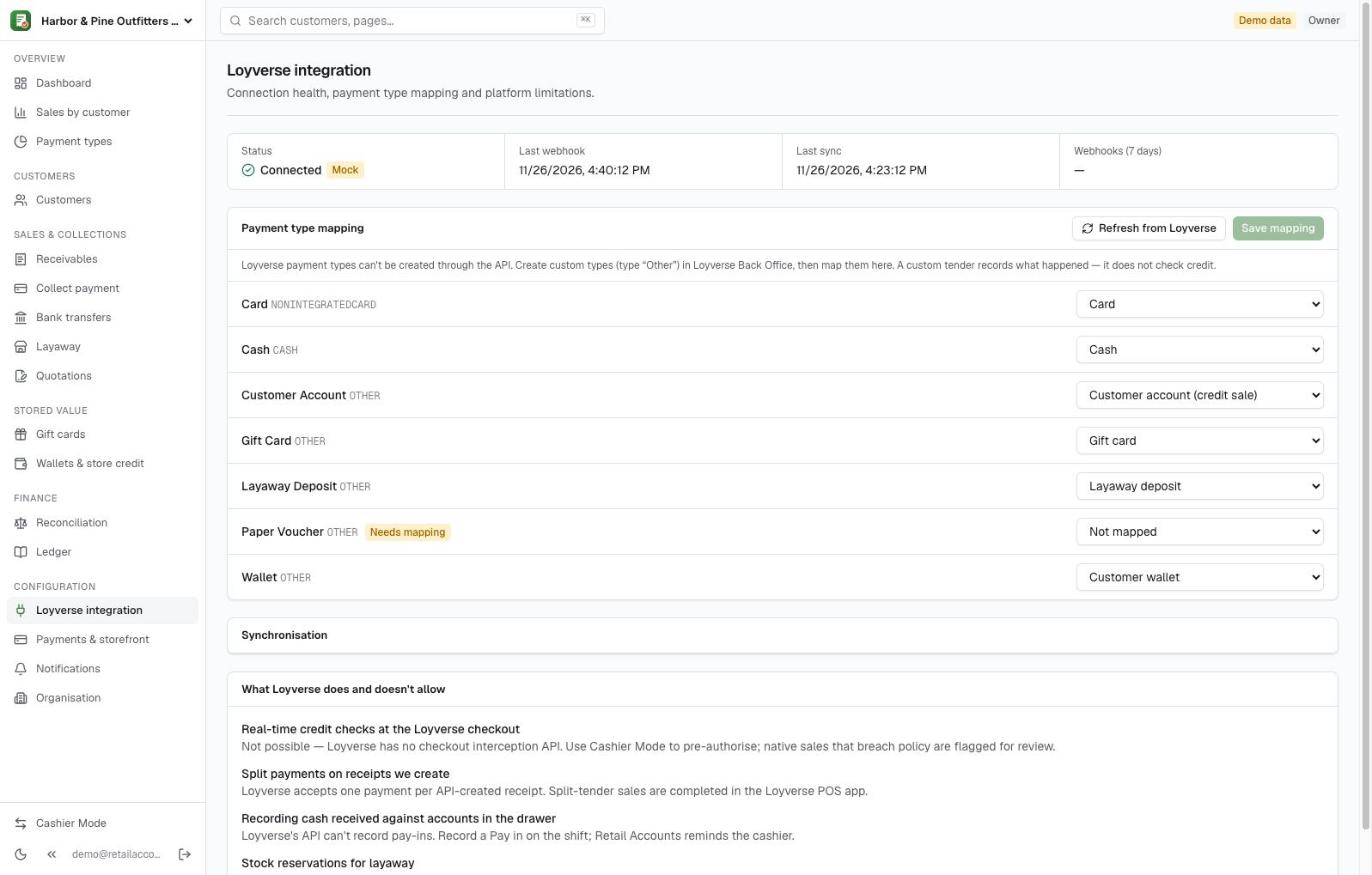
- 1Connection health — status, the last webhook received from Loyverse and the last full sync.
- 2Refresh from Loyverse — Loyverse doesn't notify apps when you add or rename a payment type, so they sync hourly; refresh to see a new one immediately.
- 3Save mapping after changing any role.
- 4Your payment types, exactly as named in Loyverse, with their Loyverse type (CASH, NONINTEGRATEDCARD, OTHER…).
- 5Needs mapping — a custom type nobody has explained yet. Sales paid with it can't be recorded correctly until you choose a role.
What each role means
| Role | Use it for | What happens to a sale paid with it |
|---|---|---|
| Customer account (credit sale) | Buy now, pay later | Creates an invoice on the customer’s account. |
| Gift card | Redeeming gift cards | Reduces the gift card balance. |
| Customer wallet | Spending prepaid wallet money | Reduces the wallet balance. |
| Store credit | Spending store credit | Reduces store credit. |
| Layaway deposit | Using money already paid on a layaway | Draws down the layaway deposit at pickup. |
| Cash / Card / Bank transfer | Money received at the till | Recorded as money in; usable in Collect payment. |
| Other (settled) | Vouchers or tenders settled elsewhere | Recorded as settled; no balance changes. |
| Ignore | Tenders that should be skipped | Not used by Zetliq. |
Only custom types can be account tenders
Financial roles (customer account, gift card, wallet, store credit, layaway deposit) can only be given to custom “Other” types. Loyverse's API is read-only for payment types, so create them in Loyverse Back Office first.
What Loyverse does and doesn't allow
- No real-time credit checks at the Loyverse checkout. Loyverse can't ask an app before completing a sale. Use Cashier Mode to check first; sales that break your credit policy are flagged in Reconciliation.
- Split payments are made in the Loyverse app. Receipts created through the API accept one payment.
- Cash pay-ins. Loyverse's API can't record cash put into the drawer; when you take cash for an account payment, record a Pay in on the Loyverse shift — Zetliq reminds you.
Something unclear? Tell us.